> ## Documentation Index
> Fetch the complete documentation index at: https://help.aichat.com/llms.txt
> Use this file to discover all available pages before exploring further.
# Connecting Facebook
> Automate and reach your Facebook audiences
# **Integrating your Facebook Page with AiChat allows you to:**
* Monitor and respond to text messages in our multi-channel inbox.
* Increase customer engagement with 24/7 bot response
* Boost customer conversion using flows to automate leads generation and other activation conversations.
* Acquire new Facebook customers with Facebook Page Comment Automation
# **How to Connect Your Facebook Page to the Chatbot**
#### Requirements:
* You, must be an administrator or have full control of Meta Facebook Page you wish to connect
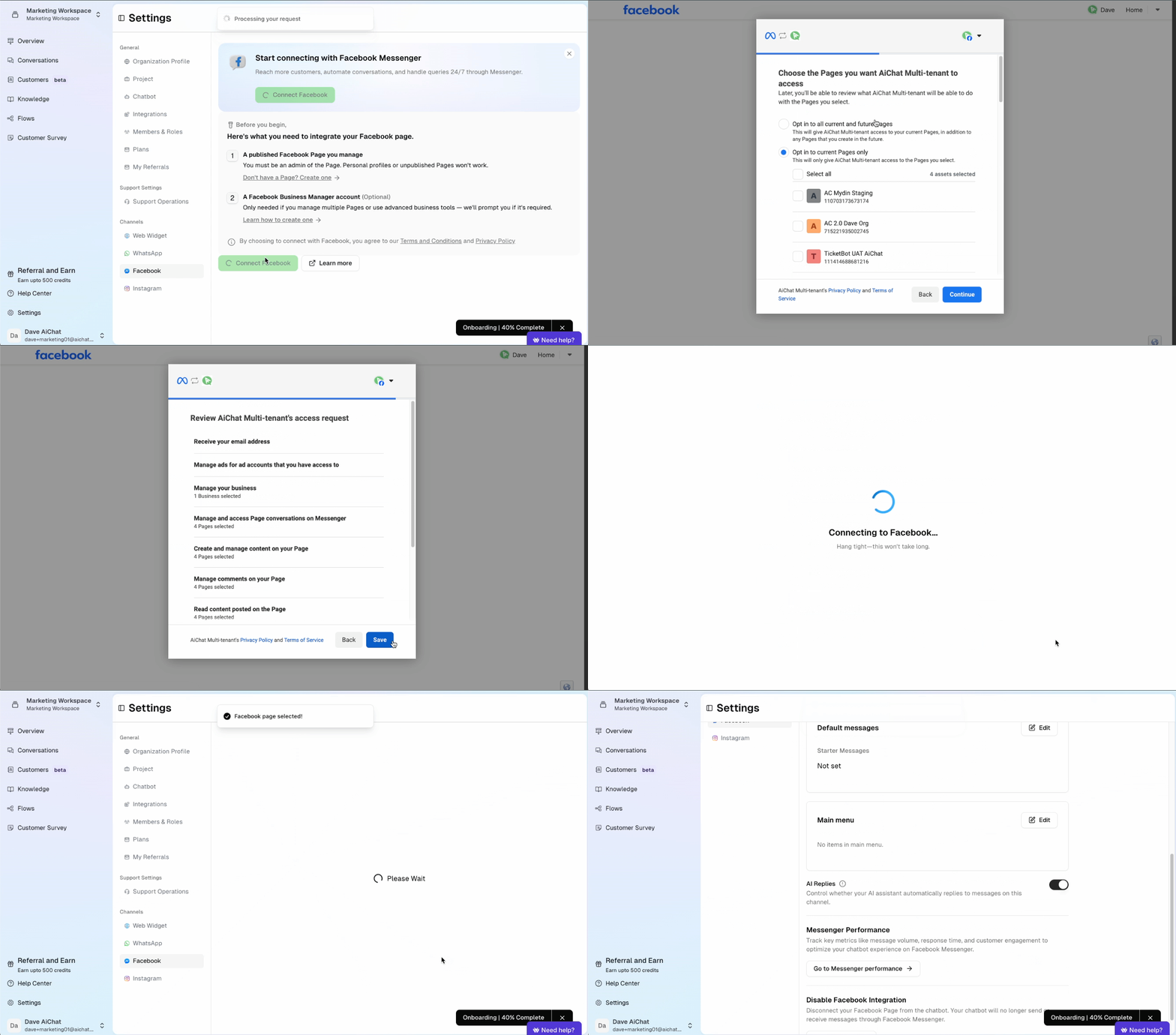 ### **Step 1: Integrate Facebook Page in AiChat**
1. In your AiChat dashboard, go to **Settings → Channels → Facebook**.
2. Click **Enable Facebook for Your Business** and follow the prompts to link your accounts.
3. Select the Facebook page you want to connect, and select the Meta Business Profile you are using
4. Upon successful registration, you will return back to AiChat portal with page connected.
## **Step 2: Managing Your Facebook Integration in AiChat**
Once your Facebook page is successfully integrated with AiChat, you can manage some essential options to engage with your Facebook audience.
### Facebook page
You can customise the following Facebook specific engagements
* \*\*Default Starter Messages \*\*Displays to 4 starter messages that appears to only new Facebook conversations.
### **Step 1: Integrate Facebook Page in AiChat**
1. In your AiChat dashboard, go to **Settings → Channels → Facebook**.
2. Click **Enable Facebook for Your Business** and follow the prompts to link your accounts.
3. Select the Facebook page you want to connect, and select the Meta Business Profile you are using
4. Upon successful registration, you will return back to AiChat portal with page connected.
## **Step 2: Managing Your Facebook Integration in AiChat**
Once your Facebook page is successfully integrated with AiChat, you can manage some essential options to engage with your Facebook audience.
### Facebook page
You can customise the following Facebook specific engagements
* \*\*Default Starter Messages \*\*Displays to 4 starter messages that appears to only new Facebook conversations.
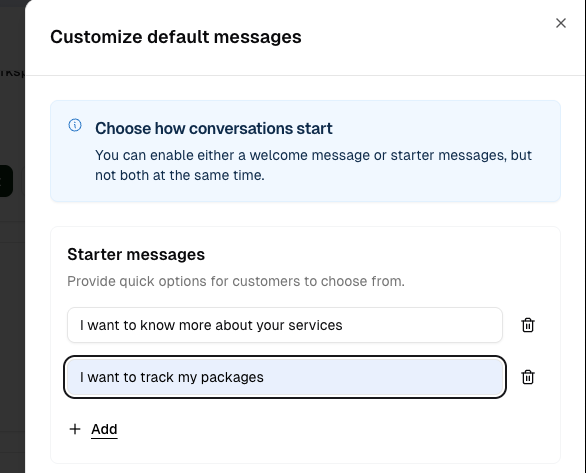 * **Persistent Main Menu**: Displays up to 20 menu items that Facebook customers can access through the Messenger profile.
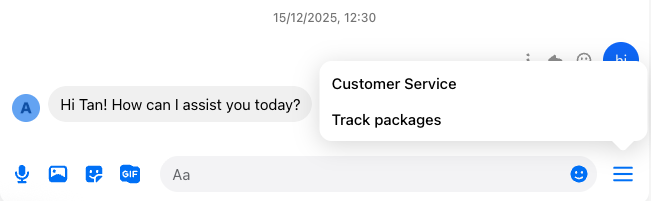 * **Menu Item Title**: Displays the menu item label on the menu, up to 30 characters
* **Quick reply type**: When Facebook customers selects menu items of this type, the message is sent to our bot for processing like a normal message sent
* **URL type**: Opens the built-in Facebook Messenger browser with the URL provided
### Disconnecting Facebook Integration
You can disconnect your Facebook page from our AiChat platform at anytime.
* Select **Disable Facebook Integration** to disconnect.
* The chatbot will stop sending/receiving messages.
* You can reconnect your Facebook page at any time to resume sending and receiving messages through the chatbot.
* **Menu Item Title**: Displays the menu item label on the menu, up to 30 characters
* **Quick reply type**: When Facebook customers selects menu items of this type, the message is sent to our bot for processing like a normal message sent
* **URL type**: Opens the built-in Facebook Messenger browser with the URL provided
### Disconnecting Facebook Integration
You can disconnect your Facebook page from our AiChat platform at anytime.
* Select **Disable Facebook Integration** to disconnect.
* The chatbot will stop sending/receiving messages.
* You can reconnect your Facebook page at any time to resume sending and receiving messages through the chatbot.